Requesters
Intercessor maintains a dedicated requester record for people who submit prayer requests. A requester can have multiple prayer requests associated with the same record.
Requesters list
Go to Intercessor → Requesters to view the requester records stored by Intercessor.
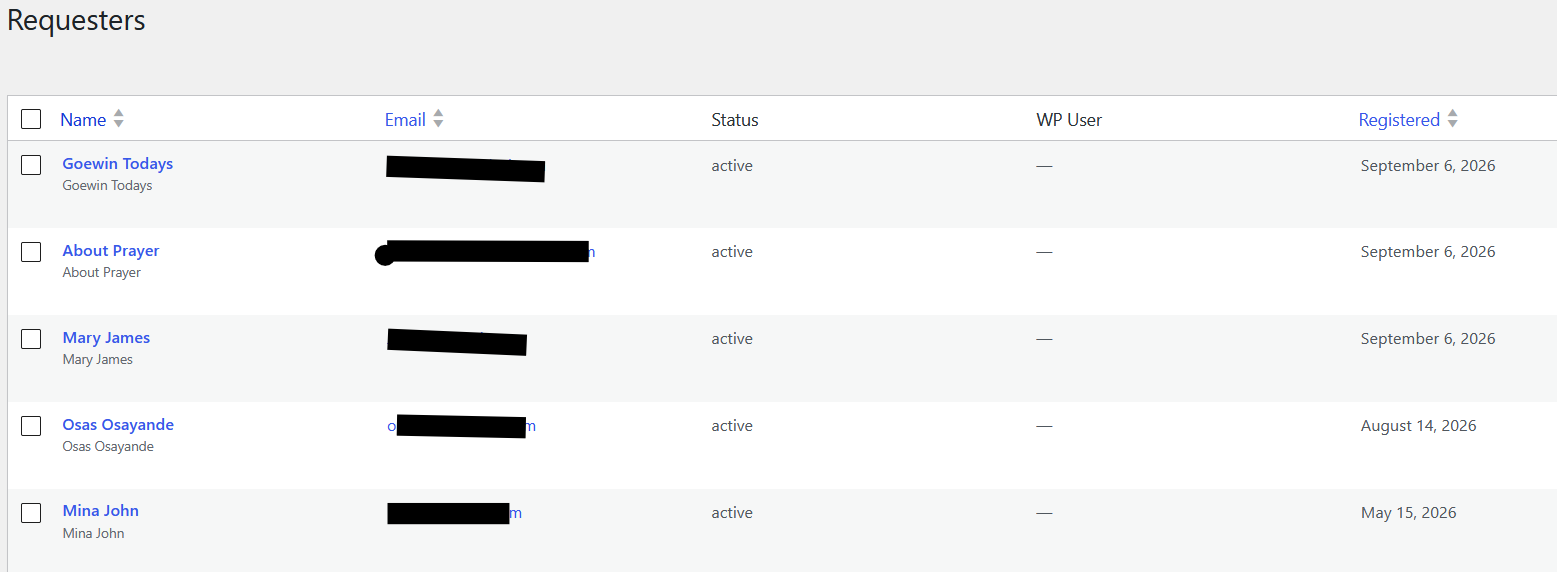
The list provides the following information:
| Column | Description |
|---|---|
| Name | The requester's name. Select the name to open the requester detail screen. |
| The email address associated with the requester record. | |
| Status | The current requester status, such as active. |
| WP User | The linked WordPress user, when one exists. A dash indicates that the requester is not linked to a WordPress account. |
| Registered | The date on which the requester record was created. |
The checkboxes allow administrators to select requester records for available bulk actions.
TIP
Requester records are associated by email during prayer-request submission. This allows multiple requests from the same person to be associated with one requester record.
Opening a requester
Select a requester's name from the list to open the requester detail screen.
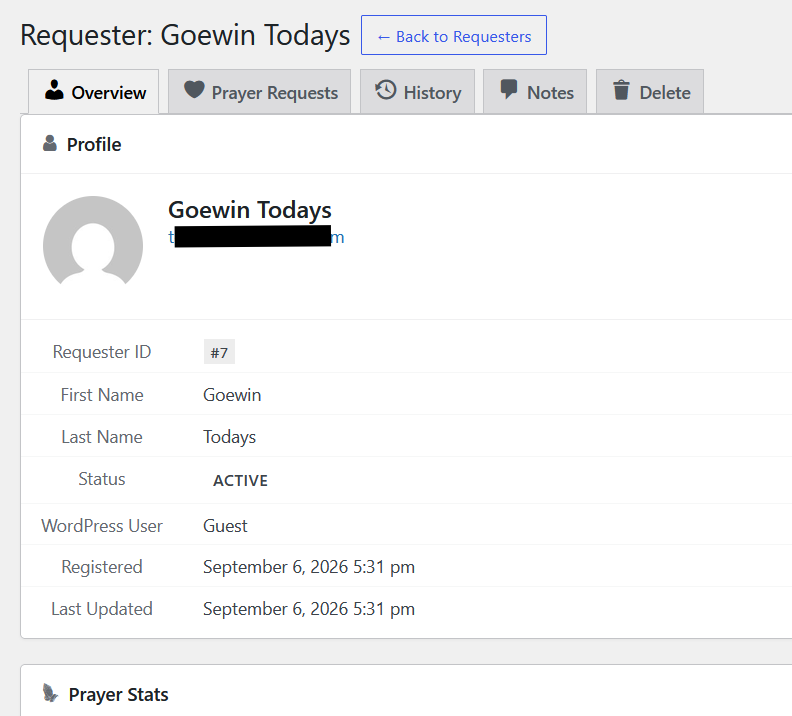
The requester detail screen provides tabs for managing and reviewing the requester's information and activity:
- Overview — displays the requester's profile and account information.
- Prayer Requests — displays prayer requests associated with the requester.
- History — provides the requester's recorded activity/history.
- Notes — provides private administrative notes for the requester.
- Delete — provides the option to delete the requester record.
A Back to Requesters button returns to the requester list.
Profile information
The Overview screen can display information such as:
- Requester ID
- First name
- Last name
- Status
- WordPress user association
- Registration date
- Last updated date
In the example screenshot, the requester is shown as a Guest, meaning the requester record is not linked to a WordPress user account.
WARNING
The screenshots contain example requester information. In a real installation, requester records may contain names, email addresses, and other personal information. Restrict access to requester data to users who need it for prayer-management responsibilities.
Requester deduplication
During prayer-request submission, Intercessor looks for an existing requester using the submitted email address. If a matching requester is found, the new prayer request can be associated with that existing record rather than creating another requester record.
This provides a central requester record for managing a person's prayer-request activity.
WordPress user linking
A requester can optionally be linked to a WordPress user account. This relationship is used by features such as the Prayer History experience for logged-in users.
Requester notes
Requester notes are private administrative annotations attached to the requester record. They are separate from notes attached to an individual prayer request.
Use requester notes for information that applies to the requester as a whole rather than to one specific prayer request.
Deleting a requester
Use the Delete tab on the requester detail screen when a requester record needs to be removed.
Before deleting a requester, review the associated information and follow your site's data-retention and privacy procedures.