Submitting Prayer Requests
The Prayer Form block provides the front-end submission experience for visitors.
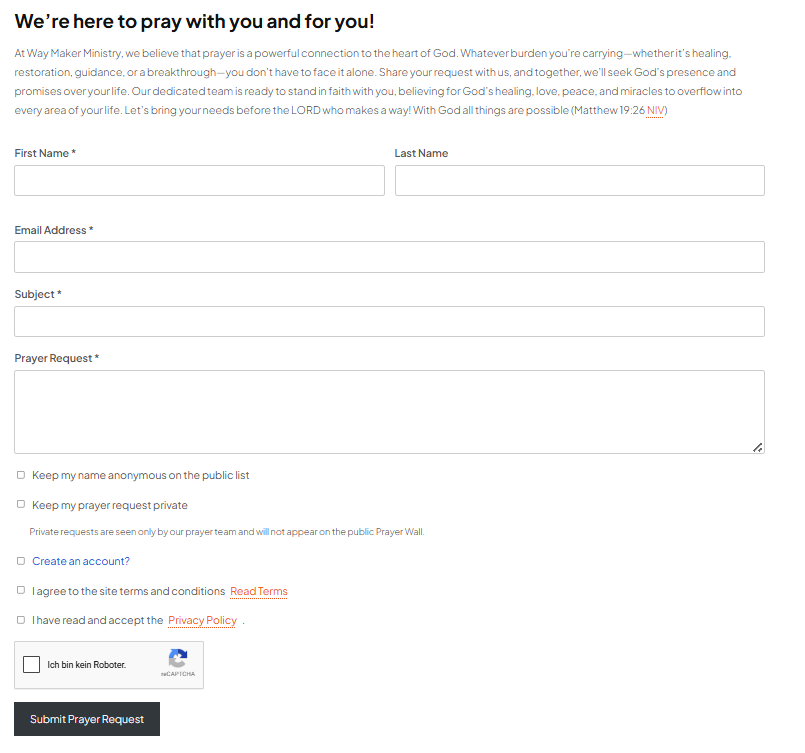
Screenshot note: The heading, introductory text, and reCAPTCHA language shown above are site-specific customizations from a live installation. Your form will reflect your own content and language settings.
Submission flow
A typical submission is processed through the same pipeline regardless of whether it comes through the front-end form or the REST API:
- Rate limiting is checked.
- Duplicate-subject protection is checked when enabled.
- The profanity filter checks the subject and content.
- The requester record is found or created using the email address.
- The prayer request is stored.
- Configured notification emails are sent.
Authentication, nonce, and reCAPTCHA checks are applied by the relevant transport before the shared submission pipeline runs.
Form information
The form can collect:
- Email address
- First name
- Last name
- Subject
- Prayer request content
- Anonymous preference
- Private-request preference when enabled
- Terms/privacy acceptance when configured
Anonymous submissions
Enable Allow Anonymous Requests when visitors should be able to submit a request without displaying their name publicly. This does not remove the requester record from the database; it controls public identity display.
Private submissions
Enable Allow Private Requests to add a private-request option to the form. A private request is stored as private and is excluded from the public Prayer Wall.
Login and registration
Intercessor can optionally require visitors to log in before submitting. Registration-related settings can also allow new users to be registered and can generate usernames/passwords for those accounts.
Spam and abuse controls
Intercessor includes three complementary controls:
Rate limiting
Max Requests Per Email / Day limits how many requests an email address can submit during a 24-hour window. Set it to 0 to disable the limit.
Duplicate prevention
When Prevent Duplicate Requests is enabled, a requester cannot submit another request using the same subject.
Profanity filter
The profanity filter does not reject matching requests. Instead, matching submissions are forced into Pending status and receive a moderator note identifying the matched terms.
WARNING
Do not treat the profanity filter as a content blocker. It is a moderation signal that gives a human moderator the final decision.